Restore a previous version in Strapi
Put back only the fields you need from any version of a Strapi entry. The restore becomes a new version, other locales stay as they are, and you can undo it.
Rolling an entry back as a whole often undoes good work along with the mistake. Revisionary restores only the fields you pick.
Tick the fields to put back
Select a version and click Restore, or press R. Revisionary lists the fields that differ from the current entry. Only the ticked fields change; everything else stays as it is now.
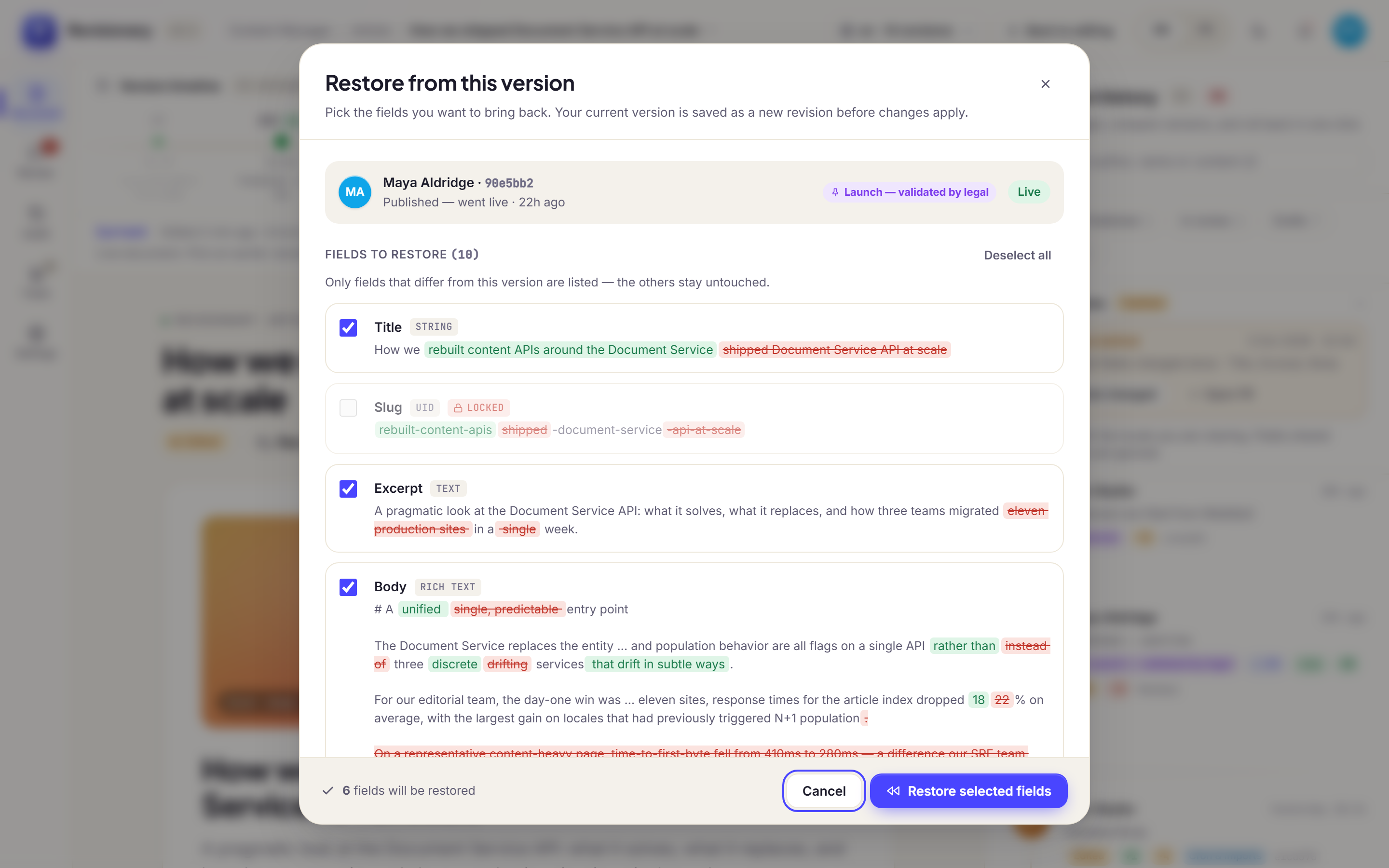
- A restore is a new version. The history continues and nothing is erased.
- One locale at a time. The restore applies to the locale you are viewing; other translations are left alone.
Undo
Right after a restore, a message offers to undo it. The undo lasts 10 minutes by default, and can be set to 5, 10, 30 or 60 minutes.
One field only
Hover a field and click the clock icon to see every value it has had. Restore puts back that field alone.
Who can restore
Restore is its own Strapi permission, and nobody restores a field they cannot edit. The settings decide whether people with the built-in Editor role may restore, whether Authors may restore the entries they created, and whether a restore needs the approval of someone allowed to approve reviews. Super admins can always restore.
Fields that must never go back
Some fields should never return to an old value, like a slug that is already indexed. List them as locked fields in config/plugins.ts: they still appear in the differences, marked as locked, and are never restored.
Questions and answers
Does a restore delete the newer versions?
No. A restore is a new version: the history continues and nothing is erased.
Can I restore a single field?
Yes. Tick only that field, or open the history of the field and restore that value.
Can I undo a restore?
Yes, for 10 minutes by default. The undo window can be set to 5, 10, 30 or 60 minutes.